



Modification Table
The Modification Table is used to apply special modifications to simple (unsealed) patterns which are normally not possible while your chiseled block is in the world. The following operations are provided by Chisels & Bits by default:
Mirroring
Mirroring swaps the bits within a pattern across a given axis. We support mirroring over the X, Y and Z axis individually.
NOTE
Currently we do not support any combinatorical operations, if you need to mirror over X and Y, apply the required operations individually.
When you perform a mirror the bits are swapped along the middle of the block with respect to the axis that you selected.
Rotating
Rotating rotates the bits within a pattern around a pole standing in the center of the block around the given axis of a block, by 90 degrees. We support rotating around the X, Y, and Z axis individually.
TIP
Other mods can use Chisels & Bits' API to extend the operations which can be applied through the Modification Table, additionally data packs can enable or disable these operations as they are recipes.
Interface
Right-Clicking the block opens up its interface:
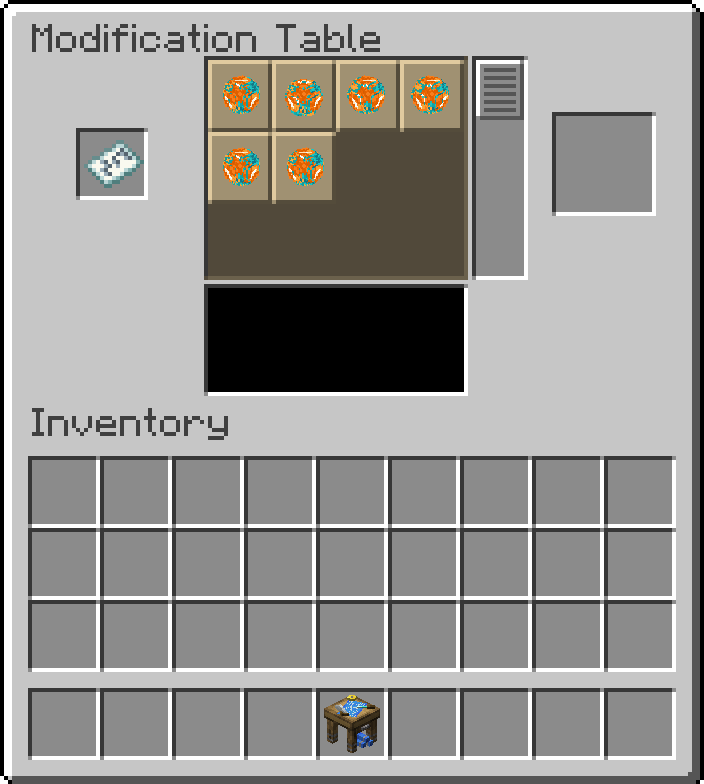
This interface is made up out of 2 sections. The lower section is your inventory, you can use it to pick the patterns you want to modify, or store the patterns again after you have modified them.
The upper section is the modification table itself. It is again decided in three areas. On the left you will find the input slot. Put your starting template here. On the right you will find the output slot. Once you are happy with the modification that is applied then you can pick up the result here, this consumes the input and applies your requested modification.
The center area is your operator selector and preview window. Once you place a pattern in the input, all operations which can be applied to the patterns contents are shows here and each show a small preview of the operation that they will apply. You can scroll the selector to see more options. Below the selector is the preview window. Left-Clicking and dragging in this are causes it to rotate the preview, scrolling allows you to zoom in and out, so you get to see the details you are interested in before applying the operation.