

Bit Bags
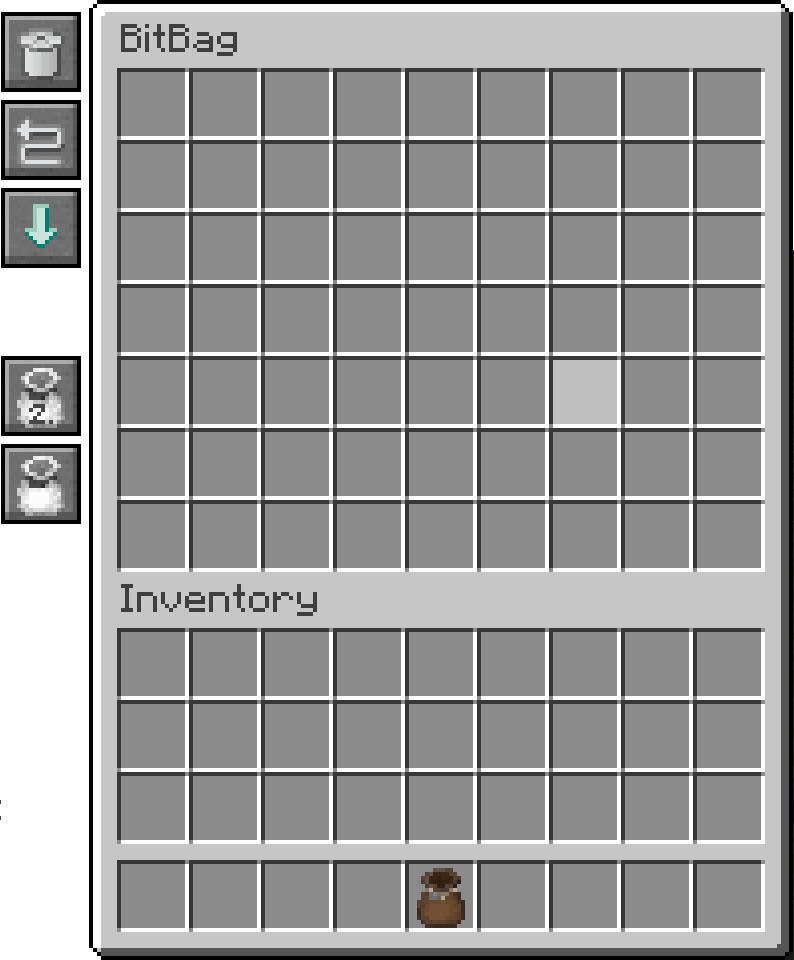
Bit Bags allow you to store a lot of bits in a single inventory slot, Right-Clicking/Using it opens its interface and allows you to interact directly with its inventory.
Picking up and using bits
When your player breaks bits, or when it picks up bits, the individual pickup modes, and filtering configuration that the bags, in your inventory, have, determine where the bit gets stored. Additionally, these modes also determine the order from where bits are extracted when you try to place the bits.
Pickup Priority
Using the pickup priority button on the left hand side of the UI you can determine whether this picked up or broken bit gets first into the bag or first into the player inventory. This also determines where used bits are extracted from first. If a bit goes first into your inventory it will also be extracted from there too.
To toggle this behavior, use the top button of the second set on the left hand side:

Filtering mode
Enabling filtering mode (button on the left hand side of the UI under the priority button), will allow you to have multiple bags which contain different kinds of bits. Filtering mode will only allow automatic insertion of bits which are already in your bit bag. Naturally, it has no effect on extraction of bits during placement, as you naturally can only extract bits which are already present in your bag.
To toggle this behavior, use the bottom button of the second set on the left hand side:

Trash Can
A bit bag has a trash can feature, in the top left you will find a button with a trash can icon (first button of the first set on the left hand side), clicking it without a bit will empty the entire bag (you need to click twice to verify that you want to do this!) If you click while holding a stack of bits, then it will only delete the bits of that type, including the one you are holding.
Sorting and compressing
Overtime the bit stacks in your bit bag can become quite a mess, with some partially filled, and spread out through the entire bag. Pressing the sorting and compressing button (second button of the first set on the left hand side), will result in all stacks being compressed into as little as possible, and sorting them based on their block names.
Combining back into blocks
Once you have enough bits collected, it might make sense to compress them back down into full blocks. For this you can press the combine and extract button (third button of the first set on the left hand side). This will turn all bits of which you have more than 4096 (on the default 16 bits per side, otherwise it will use less depending on the bit scaling factor) into blocks. Consuming exactly 4096 bits in the process and giving you exactly 1 block for each operation in your inventory. Dropping the blocks if they can not fit.
Interface
Right-Clicking the bag opens up its interface: